2022/06/06
flaskでTodoリストの作成
独力でのflaskで簡単なWebサイトの作成が目標
今回作成したのはログイン機能もデータベースもないTodoリスト
データベースの代わりにjsonを利用してデータの保存をする
必要な知識等
簡単なflaskの使い方
pythonでのjsonの扱い
htmlのformタグ
bootstrapは申し訳程度
コード
<!DOCTYPE html>
<html lang="ja">
<head>
    <meta charset="UTF-8">
    <meta http-equiv="X-UA-Compatible" content="IE=edge">
    <meta name="viewport" content="width=device-width, user-scalable=no, initial-scale=1.0, maximum-scale=1.0, minimum-scale=1.0">
    <link href="../static/main.css" rel="stylesheet">
    <link href="https://cdn.jsdelivr.net/npm/bootstrap@5.2.0-beta1/dist/css/bootstrap.min.css" rel="stylesheet">
    <title>To do リスト</title>
</head>
<body>
    <h1>Todoリスト</h1>
    <form action="/save" method="post">
        <table>
            <tr>
                <th>内容 : </th>
                <th><textarea name="todo"></textarea></th>
            </tr>
            <tr>
                <th>期日 : </th>
                <th><input type="date" name="end_date"></th>
            </tr>
            <!-- <tr>
                <th>締切時間 : </th>
                <th><input type="time" name="time"></th>
            </tr>
            <tr>
                <th>ステータス</th>
                <th>
                    <p>新規(未着手)<input type="radio" name="status" value="new"></p>
                    <p>実施中<input type="radio" name="status" value="doing"></p>
                    <p>延期<input type="radio" name="status" value="postponed"></p>
                    <p>完了<input type="radio" name="status" value="done"></p>
                </th>
            </tr> -->
        </table>
        <div class="button">
            <input type="submit" value="追加する" class="btn btn-primary">
            <input type="reset" value="リセット" class="btn btn-secondary">
        </div>
    </form>
    <hr>
    <table class="table">
        <tr>
            <th>ID</th>
            <!-- <th>ステータス</th> -->
            <th>内容</th>
            <th>期日</th>
            <!-- <th>締切時間</th> -->
            <th>登録日</th>
        </tr>
        {% for item in todo_list %}
        <tr>
            <th>{{item.ID}}</th>
            <!-- <th>ステータス</th> -->
            <th>{{item.todo}}</th>
            <th>{{item.end_data}}</th>
            <!-- <th>締切時間</th> -->
            <th>{{item.created_at}}</th>
        </tr>
        {% endfor %}
    </table>
</body>
</html>
./templates/index.html
テンプレートエンジンを利用してpythonから変数を持ってきてレンダリングしているのは二つ目のtableだけ
簡単な説明(上から)
formタグを利用して、Todoの内容と期日をpostメソッドで取得する
二つ目のtableでは、app.pyでのテンプレートエンジンによるレンダリングの際に変数をHTMLに渡している
formのaction属性は、python上で"/save"に飛ばして"/"へリダイレクトすることを考えていたのでこのようになっている
他にも色々な要素をつけたかったが次回の課題とする
h1{
    text-align: center;
}

table{
    margin:0 auto;
}

.button{
    /* text-align: center; */
    margin:10px auto;
    text-align: center;
}
./static/main.css
申し訳程度にbootstrupを使って形を整えた
センタリングだけmain.cssで行っている
import json
import datetime
from flask import Flask, render_template, request, redirect

DATABASE_FILE = 'todo.json'

app = Flask(__name__)

def save_data(id, todo, end_date, created_at):
    # ここで大まかな型なんかを決めているが、結局のところ書き込むときはstr
    """Todoリストのデータを保存する
    :param ID: ID
    :type ID: int
    :param todo: Todo内容
    :type todo: str
    :param end_date: 期日
    :type end_date: datetime.date
    :param created_at: 登録日
    :type created_at: datetime.datetime
    """

    try:
        db = json.load(open(DATABASE_FILE, mode="r", encoding="utf-8"))
    except FileNotFoundError:
        db = []

    # jsonモジュールについて調べる
    # todo.jsonへのデータの挿入
    # リスト操作、インデクスをもつ要素(第一引数)の直前にこのデータを入れている
    db.insert(0,{
        "ID": id,
        "todo": todo,
        "end_data": end_date,
        "created_at": created_at.strftime("%Y/%m/%d,%H:%M"),
    })

    json.dump(db, open(DATABASE_FILE, mode="w", encoding="utf-8"), indent=4, ensure_ascii=False)

def load_data():
    # 途中の属性に抜けがあるとエラーを吐く
    try:
        db = json.load(open(DATABASE_FILE,mode="r", encoding="utf-8"))
    except FileNotFoundError:
        db = []
    return db

@app.route('/')
def index():
    todo_list = load_data()
    return render_template('index.html', todo_list=todo_list)

@app.route('/save', methods=['POST'])
def save():
    id = 1
    todo = request.form.get('todo')
    end_date = request.form.get('end_date')
    created_at = datetime.datetime.now()
    save_data(id, todo, end_date, created_at)
    print(end_date)
    print(type(end_date))
    return redirect('/')

if __name__ == "__main__":
    # データ挿入見本
    # end_date = datetime.date(2020, 6, 3)
    # created_at = datetime.datetime.now()
    # # print(end_date.strftime("%Y%m%d"))
    # # print(created_at.strftime("%Y%m%d,%H%M"))
    # save_data(1, '勉強する', end_date.strftime("%Y%m%d"), created_at)
    app.run(debug=True)
./app.py
コーディングの順番
JSON形式の扱いについて記述(save_data, load_data)
対話シェルもしくはmainにJSON挿入のコードを書いてJSONファイルに保存できるかを確認(main下のデータ挿入見本)
htmlをテンプレートエンジンを用いてレンダリング(index()->この時は`return render_template("index.html")のみ)
仮で入れたデータがhtmlに反映されるか確認(index.htmlの二つ目のテーブルをテンプレート言語に変える、index()でJSONデータを変数として渡す)
フォームからデータを受け取れることを確認(save())
フォームのデータをJSONファイルに保存できるように変数名、型などを微調整
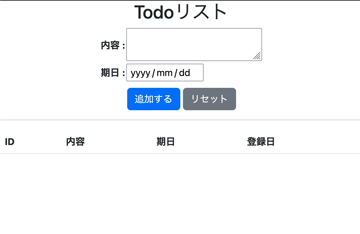
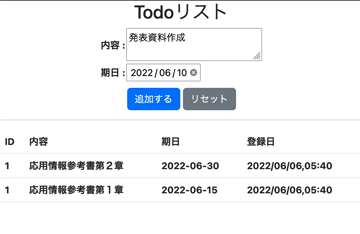
実際に使った様子(画像等)
まとめ
とりあえずWebサイトの見た目を作るセンスがなさすぎる
今後の課題
IDをうまく増加させ、IDをキーとして削除、編集ができるようにする
Jsonのへのデータ挿入、削除の方法を調べる
変数の命名やgitのcommitメッセージを書くときにだいぶ悩んだので、よく使うもの(登録日、開始日時、変更、修正、完了、実施中等)を調べておく
検索用タグ
flask, json, html, bootstrap